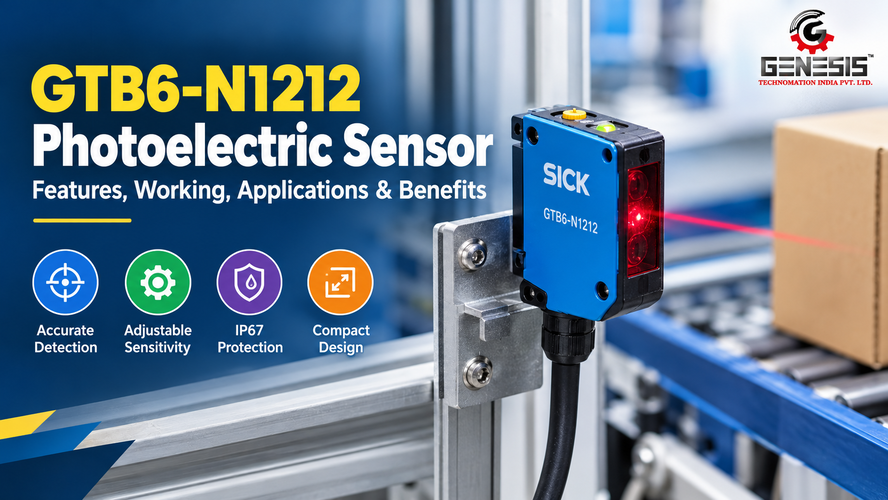
GTB6-N1212 Photoelectric Sensor is a compact industrial object detection device from the G6 series of SICK. It uses photoelectric proximity sensing with background suppression to detect objects without requiring physical contact. This makes it a useful option for selected automation tasks where a controller needs to identify the presence of a product, component or moving object.
In industrial environments, dependable object detection helps machines maintain their operating sequence. A sensor can signal when a product reaches a conveyor position, when a component enters an assembly station or when an item arrives at a packaging point. The controller can then use that signal to initiate the next operation.
The GTB6-N1212 has a visible red PinPoint LED, an NPN switching output and a mechanical adjustment mechanism. Its published sensing specifications distinguish between a maximum sensing range of 5 mm to 250 mm and a specified sensing range of 35 mm to 140 mm. Understanding this distinction is important when selecting the sensor for a real production process.
This guide covers the GTB6-N1212 Photoelectric Sensor specifications, working principle, features, applications, installation requirements, troubleshooting methods and purchasing considerations. It also explains which parameters engineers should verify before integrating the sensor into an industrial control system.
GTB6-N1212 Photoelectric Sensor: Product Overview
The GTB6-N1212 is a miniature photoelectric proximity sensor manufactured by SICK. Its product number is 1052445, and it belongs to the company’s G6 miniature photoelectric sensor series. The model uses background suppression, which allows the sensor to distinguish objects based on their position relative to the configured detection point rather than relying only on the amount of reflected light.
This detection method can be useful when products move past a sensor against a background that should not trigger the same response. However, performance depends on target characteristics, sensing distance, alignment and the actual installation geometry.
The sensor produces a digital NPN output that a compatible controller can interpret as a detection event. Its light/dark switching mode is selectable, allowing the output response to be configured according to the application and the controller’s signal logic. Engineers must confirm the required electrical interface before connecting it to a PLC or machine controller.
The published product documentation identifies a rectangular plastic housing measuring 12 mm × 31.5 mm × 21 mm, a three-wire cable measuring 2 metres and an included stainless-steel mounting bracket. These characteristics support installation in suitable machine layouts where a compact sensing device is required.
What Is the Purpose of the GTB6-N1212 Sensor?
The primary purpose of the GTB6-N1212 is non-contact object detection within its applicable operating range. Depending on the target and machine configuration, it may be used to:
- Detect product presence at a defined point.
- Provide a trigger signal to a PLC.
- Support conveyor sequencing and product monitoring.
- Confirm the arrival of a component at an assembly station.
- Assist with counting or position-related control tasks when the application meets the sensor’s response requirements.
These are potential applications, not a guarantee that the sensor will detect every material or object reliably. The target must be tested under the intended production conditions.
GTB6-N1212 Photoelectric Sensor Features and Specifications
The GTB6-N1212 combines background suppression, a visible red LED, adjustable sensitivity and an NPN digital output. These features help engineers configure the sensor for specific object detection tasks while maintaining compatibility with an appropriately designed control system.
GTB6-N1212 Photoelectric Sensor Specifications
| Parameter | Specification |
| Manufacturer | SICK |
| Product series | G6 miniature photoelectric sensors |
| Model | GTB6-N1212 |
| Part number | 1052445 |
| Sensor type | Photoelectric proximity sensor |
| Detection principle | Background suppression |
| Maximum sensing range | 5 mm to 250 mm, depending on operating conditions |
| Specified sensing range | 35 mm to 140 mm |
| Light source | PinPoint LED |
| Light colour | Visible red |
| Wavelength | 650 nm |
| Light spot size | Approximately 6 mm diameter at 100 mm |
| Sensitivity adjustment | Mechanical spindle, five turns; potentiometer adjustment |
| Supply voltage | 10–30 V DC |
| Supply voltage ripple | ±10% |
| Current consumption | 30 mA without load |
| Output type | NPN digital output |
| Switching mode | Selectable light switching or dark switching |
| Maximum output current | 100 mA, subject to the voltage-dependent limit |
| Response time | Less than 625 µs |
| Switching frequency | 1,000 Hz |
| Connection | Three-wire cable, 2 m |
| Conductor cross-section | 0.14 mm² |
| Housing | Rectangular ABS/PC plastic |
| Front screen | PMMA plastic |
| Dimensions (W × H × D) | 12 × 31.5 × 21 mm |
| Weight | Approximately 60 g |
| Enclosure rating | IP67 |
| Operating temperature | −25°C to +55°C |
| Storage temperature | −40°C to +70°C |
| Included accessory | Stainless-steel mounting bracket, BEF-W100-A |
| Protection class | III |
Confirm the current manufacturer datasheet and applicable operating conditions before installation or purchase. The maximum output current has a lower limit at supply voltages above 24 V DC.
Background Suppression for Object Detection
Background suppression is a central feature of the GTB6-N1212. It allows the sensor to distinguish objects according to their position relative to the configured detection point, reducing the influence of certain backgrounds that might otherwise be detected through reflected light.
For example, a machine may need to detect a component passing in front of a fixed surface. Correctly configured background suppression can help the sensor respond to the component instead of the background. The actual result depends on the object’s reflectivity, distance, orientation and surrounding geometry.
This feature does not mean that background detection is impossible under every condition. A shiny background, an unusually reflective target or incorrect adjustment may still affect performance. Testing with the actual components is essential.
Adjustable Sensitivity
The manufacturer’s documentation identifies a mechanical adjustment mechanism with five turns and a sensitivity control potentiometer. This allows the detection setting to be adjusted for the application rather than relying on an unchangeable factory setting.
During commissioning, technicians should adjust sensitivity in small increments while observing the sensor’s status indicators and testing both the intended target and the background. The final setting should provide a reliable detection margin without creating unwanted triggers.
Compact Housing and IP67 Protection
The GTB6-N1212 measures just 12 mm × 31.5 mm × 21 mm. Its compact rectangular body can be useful where machine frames, guides and conveyor assemblies leave limited mounting space.
The IP67 enclosure rating indicates protection against dust ingress and temporary immersion under specified test conditions. It does not make the sensor suitable for every industrial environment, nor does it automatically establish resistance to high-pressure washing, aggressive chemicals, oil exposure or every cleaning process. Those conditions should be checked separately.
Electrical Output and Response Time
The sensor uses an NPN digital output. Its documented response time is less than 625 microseconds, with a switching frequency of 1,000 Hz under the manufacturer’s stated test conditions. These specifications are relevant when evaluating detection of moving objects or integration into a time-sensitive machine sequence.
A fast sensor response does not guarantee that a complete machine can operate at the same frequency. PLC scan time, input filtering, product spacing, mechanical travel and the control program also affect the final system performance.
How the GTB6-N1212 Photoelectric Sensor Works
The GTB6-N1212 uses a photoelectric proximity detection principle with background suppression. It emits visible red light through its PinPoint LED and evaluates the received optical signal to determine whether a target is present within the configured detection region.
Its operation can be understood through the following sequence:
Object movement → Light emission → Target detection → Background suppression → Output switching → Controller action
Light Emission
The sensor emits a visible red light spot towards the detection area. This light provides the optical signal used to identify an object within the configured sensing region.
Target Detection
When an object enters the sensing area, some emitted light returns to the sensor. The amount and characteristics of the received light depend on the target’s material, colour, shape, surface finish and position.
Background Suppression
The sensor evaluates the target relative to its configured detection point. This allows it to distinguish a suitable target from certain background surfaces, although actual performance depends on the installation and target characteristics.
Output Switching
When the configured detection condition is met, the sensor changes its NPN output state. The selected light/dark switching mode determines the output response under the relevant detection conditions.
Controller Action
A compatible PLC or machine controller interprets the signal and executes the programmed sequence.
Consider a conveyor carrying plastic components towards an assembly station. The GTB6-N1212 can be mounted beside the conveyor so that the component passes through its detection region. When the configured detection condition is met, the sensor changes its output state. The PLC can use that transition to register product arrival, subject to the application’s timing and control logic.
The sensor does not directly command every downstream device. The PLC program determines whether the detection event should start a motor, operate a pneumatic actuator, increment a counter or permit the next stage of production.
Light Switching and Dark Switching
The GTB6-N1212 supports selectable light/dark switching. The correct setting depends on the required relationship between the received light condition and the output state. The exact signal behaviour should be checked against the manufacturer’s connection diagram and operating instructions.
During commissioning, test both the target-present and target-absent conditions. Confirm the sensor’s output state, the PLC input indication and the machine response. This is especially important when replacing an existing sensor because an incorrect switching setting can reverse the intended control logic.
Detection Performance of GTB6-N1212
The GTB6-N1212’s published sensing figures should be interpreted in context. SICK specifies a maximum sensing range of 5 mm to 250 mm, a sensing range of 35 mm to 140 mm and a light spot approximately 6 mm in diameter at 100 mm. The maximum-range qualification refers to an object with 90% remission based on standard white under DIN 5033.
These figures are not interchangeable. Engineers should consult the manufacturer’s range diagrams and determine which sensing distance is appropriate for the target material and installation.
Target Colour and Reflectivity
A white surface and a dark surface may reflect different amounts of light. The manufacturer’s characteristic curves distinguish standard white, grey with an 18% remission factor and black with a 6% remission factor. This demonstrates why the sensing result should not be assumed to remain identical across different target colours.
When products vary in colour, test the lightest and darkest variants. If the sensor is intended to detect black plastic parts, for example, validate detection at the required mounting distance rather than relying solely on the maximum published range.
Target Size and Shape
A small target may not interact with the sensing area in the same way as a large object. Curved, angled or irregular surfaces can also change the amount and direction of reflected light. Mount the sensor so the relevant target area passes consistently through its detection region.
Transparent and Translucent Materials
Transparent bottles, clear film and translucent packaging can create application-specific optical challenges. Their behaviour depends on material, surface geometry, reflections and the required detection position. Do not assume that the GTB6-N1212 will reliably detect every transparent object. Conduct a practical test or evaluate a sensor designed specifically for the material if results are inconsistent.
Machine Speed and Response Time
The documented response time of less than 625 µs is one factor in determining whether the sensor can respond quickly enough. The machine’s total timing budget must also account for the distance between detection and the required action, PLC processing, input filters and actuator response.
For counting applications, test the minimum spacing between objects at the highest expected conveyor speed. Confirm that each object produces a separate signal that the control system can register.
Alignment, Contamination and Vibration
A stable mounting position helps maintain the intended detection point. Dust, residue on the optical front screen and machine vibration can alter detection conditions. Inspect the sensor during routine maintenance and verify operation with the machine running under normal production conditions.
Applications of GTB6-N1212 Photoelectric Sensor
The GTB6-N1212 can support industrial applications that need non-contact detection of objects within its verified sensing capabilities. Its background suppression principle, adjustable sensitivity and NPN output make it a candidate for selected machine-control tasks. Each application still requires validation against the actual target, operating distance and cycle time.
Object Detection in Automated Machinery
Machines often need to know whether a component has reached a particular position before the next operation begins. The GTB6-N1212 can detect a suitable target and provide a switching signal to a controller.
For example, an automated machine may use the detection event to confirm that a plastic housing has arrived at an assembly station. The PLC can then check other interlocks before allowing the assembly operation to continue.
Packaging and Production Lines
Packaging machines use product detection to coordinate feeding, filling, sealing and transfer operations. The GTB6-N1212 may be suitable for detecting products moving through a packaging station when the required distance and target properties fall within its operating capabilities.
Before installation, test the sensor against the actual packaging material. Glossy cartons, dark containers, clear film and reflective surfaces can produce different optical conditions.
Conveyor Systems
On a conveyor, the GTB6-N1212 can provide a product-presence signal for sequencing or monitoring. A PLC might use that signal to register a product at a transfer point or initiate a programmed delay.
Correct placement matters. The detection point should be positioned so that the product triggers the sensor consistently without allowing the conveyor structure or background to interfere with the intended detection.
Assembly Automation
Assembly equipment frequently checks whether a component has reached a loading position. The GTB6-N1212 may be used for this task if the component is detectable at the selected distance.
It should not be treated as proof that a component is correctly assembled. Presence detection and assembly verification are different functions. If the application requires checking orientation, dimensions or assembly quality, additional sensing or inspection may be necessary.
Material Handling and Counting
The sensor may help monitor objects moving through a handling system. Counting applications require special attention to object spacing and the controller’s ability to register each output transition.
Test with the fastest expected material flow. Closely spaced products can cause missed counts if the sensing arrangement or controller cannot resolve individual events.
Bottle, Carton and Product Detection
The GTB6-N1212 may be suitable for some bottles, cartons and manufactured products, but suitability depends on the specific material and shape.
- Opaque cartons: Check detection across different colours and surface finishes.
- Plastic containers: Test the actual container because reflectivity and curvature affect optical behaviour.
- Transparent bottles: Validate detection carefully; a different sensing technology may be needed if performance is inconsistent.
- Metal components: Test shiny surfaces and changing orientations to identify potential detection variation.
Machine Monitoring and Safety Limitations
The GTB6-N1212 can contribute to ordinary process monitoring, but it must not be assumed to be a safety-rated sensor. Its standard object-detection function is not a substitute for certified safety equipment where personnel protection is required. Select safety devices and control architectures according to the machine’s risk assessment and applicable standards.
Benefits of GTB6-N1212 Photoelectric Sensor
The benefits of the GTB6-N1212 depend on correct selection, installation and commissioning. Its documented design offers several practical advantages for suitable industrial applications.
Non-contact detection: The sensor can detect a suitable object without touching it. This avoids mechanical contact between the sensing device and the target during normal detection.
Background suppression: The detection principle can help distinguish the target from certain backgrounds. This is useful when a fixed surface lies behind the object, although the final result depends on target reflectivity, geometry and adjustment.
Compact installation: The 12 mm × 31.5 mm × 21 mm housing allows installation in locations where a larger sensor might be difficult to accommodate.
Adjustable sensitivity: The adjustment mechanism gives technicians a way to configure detection for the application. Correct adjustment can help reduce unwanted triggers and missed detections.
Fast signal response: A documented response time below 625 µs makes the sensor worth evaluating for applications that need quick detection. Actual machine performance still depends on the controller and mechanical sequence.
Selectable switching mode: Light/dark switching gives engineers a choice of output behaviour for the intended control logic.
Environmental protection: The IP67 enclosure rating supports use in appropriate industrial environments where dust and temporary water exposure are concerns. It should not be interpreted as universal chemical, washdown or impact protection.
Reduced reliance on manual observation: When integrated into a properly designed control system, the sensor can provide an automatic product-presence signal, helping machines carry out repetitive detection tasks consistently.
None of these features guarantees a particular increase in productivity or reduction in downtime. Those outcomes depend on the complete application and its maintenance practices.
GTB6-N1212 in Industrial Automation
The GTB6-N1212 is intended to provide a digital detection signal to a compatible automation system. Its NPN output makes electrical interface compatibility an important part of the design process.
Integration with PLCs and Machine Controllers
A PLC can read the sensor’s output and use the resulting input state within a programmed sequence. For example, when the sensor detects a product, the controller might record its arrival, check an interlock or initiate the next machine step.
Before connection, verify:
- That the PLC input supports the sensor’s NPN output arrangement.
- That the supply voltage falls within the specified 10–30 V DC range.
- That the input circuit and common-reference arrangement are compatible.
- That the sensor’s output current limits are respected.
- That the selected light/dark mode matches the intended logic.
- That input filtering and scan time do not interfere with the required detection timing.
NPN outputs generally operate by switching the output towards the supply’s negative reference. However, the actual installation must follow the manufacturer’s wiring diagram and the controller’s electrical documentation. Do not copy a PNP wiring arrangement or assume that all PLC input modules use the same interface.
Integration with Conveyors and Actuators
A suitable detection event can become one condition in a conveyor or actuator sequence. For example, a PLC might register a component’s arrival and then command a pneumatic actuator after confirming that the machine is ready.
The GTB6-N1212 does not directly establish the safe operating state of an actuator or guarantee a correct mechanical position. Those functions depend on the machine’s control logic, interlocks and any additional sensors required by the design.
Integration with Servo and Stepper Systems
A sensor can serve as a product-detection or sequence input in a machine that uses servo or stepper-driven mechanisms. Before implementation, engineers should evaluate the sensor’s response time, the controller’s input processing and the timing relationship between detection and motion.
If the application requires precision positioning or measurement, a simple object-presence sensor may not provide the required feedback by itself.
GTB6-N1212 Installation and Mounting Considerations
Proper installation is essential to obtaining consistent detection results from the GTB6-N1212. Follow the manufacturer’s instructions for the exact model and check all electrical limits before commissioning.
Confirm the model code. Verify that the sensor is GTB6-N1212, part number 1052445. Other G6 models may have different output types or connection configurations.
Choose the detection position. Select a point where the target passes through the sensing area consistently. Avoid a mounting position where the background is likely to be mistaken for the intended object.
Secure the mounting bracket. The product documentation identifies a stainless-steel BEF-W100-A bracket in the delivery information. Use a suitable mounting arrangement and prevent movement caused by vibration.
Set the sensing distance. Position the target within the range appropriate to its reflectivity and geometry. Do not assume that the maximum range applies equally to all materials.
Align the optical area. Ensure the intended target passes through the sensing area rather than only clipping its edge. Test objects in their normal orientation.
Adjust sensitivity. Use the documented adjustment mechanism to achieve reliable detection. Test both the target and background before finalising the setting.
Check the electrical supply. The specified supply is 10–30 V DC with ripple limited to ±10%. Confirm that the actual supply meets these requirements.
Verify the output interface. Confirm NPN compatibility, output current limits, common-reference requirements and the PLC input’s specifications before wiring.
Route the cable correctly. The model has a three-wire, 2 m cable. Protect it against abrasion, moving machinery, excessive bending and electrical interference. The datasheet cautions against bending the cable below 0°C.
Test under production conditions. Run representative products at the expected machine speed. Check for missed detections, false triggers and variations between target types.
Factors Affecting GTB6-N1212 Detection
| Factor | Why It Matters | Recommended Action |
| Incorrect alignment | The target may not pass through the intended sensing area. | Adjust the mounting position and repeat the detection test. |
| Dark or low-reflectivity targets | Less light may return to the sensor. | Check the manufacturer’s sensing-range curves and test the actual target. |
| Shiny or reflective surfaces | Reflections can change with surface angle and geometry. | Test different orientations and adjust the installation where necessary. |
| Transparent materials | Light may pass through the object or reflect unpredictably. | Test the exact material; consider a different sensing principle if needed. |
| Incorrect distance | The target may be outside the usable detection range for its properties. | Reposition the sensor using the specified range information. |
| Ambient light | Strong external illumination may affect some optical installations. | Inspect nearby light sources and follow the manufacturer’s installation guidance. |
| Dust or residue | Contamination can interfere with emitted or received light. | Clean the optical front screen using a method suitable for the material. |
| Mechanical vibration | Sensor movement can change the detection point. | Secure the mounting bracket and inspect the machine structure. |
| High operating speed | The sensor or control system may not resolve every event. | Compare cycle timing with the response specification and test at full speed. |
| Loose connections | Electrical signals may become intermittent. | Inspect the cable, terminals and controller input. |
| Electrical noise | Interference can disturb signals in poorly designed installations. | Review cable routing, grounding and electrical installation practices. |
| Incorrect PLC configuration | The sensor may switch correctly while the PLC interprets the signal incorrectly. | Check input compatibility, signal polarity, program logic and filtering. |
These are possible causes of unstable detection, not confirmed defects in the GTB6-N1212. Diagnose the complete sensing and control system before replacing the sensor.
GTB6-N1212 Maintenance and Troubleshooting
Routine inspection can help maintain consistent detection and identify installation problems before they interrupt production. The following table provides a practical starting point for technicians working with the GTB6-N1212.
| Problem | Possible Cause | Recommended Action |
| Target is not detected | Incorrect distance, alignment or sensitivity setting | Check the mounting position, target properties and adjustment. |
| Detection is intermittent | Vibration, contamination or loose connections | Secure the sensor, clean the optical surface and inspect the cable. |
| False triggering occurs | Background interference or unsuitable adjustment | Test the target and background separately and adjust sensitivity. |
| PLC does not register the output | NPN incompatibility, wiring fault or incorrect input configuration | Verify the wiring diagram, supply and PLC input interface. |
| Detection fails at higher speeds | Insufficient timing margin or poor target positioning | Check response requirements, input filtering and object spacing. |
| Different products produce inconsistent results | Variations in colour, reflectivity, shape or orientation | Test each product variant and consult the manufacturer’s sensing curves. |
| Green indicator is not illuminated | Supply voltage or connection problem | Check the power supply and wiring against the datasheet. |
| Sensor indicator responds but the machine does not | PLC logic, interlock or sequence problem | Check the PLC input status and programmed machine conditions. |
A Systematic Troubleshooting Procedure
Start by observing the fault under controlled conditions. Determine whether the problem occurs continuously or only with specific products, speeds or operating conditions.
Next, inspect the sensor’s green supply indicator and yellow received-light status indicator. The manufacturer identifies these indicators in the dimensional drawing and adjustment documentation. Their behaviour can help distinguish a power issue from an optical detection or downstream control issue.
Then test the target at the normal sensing distance. If the sensor responds correctly while stationary but fails during production, investigate vibration, object spacing, target orientation, response timing and PLC input filtering.
Finally, verify the output electrically using an appropriate method and the manufacturer’s wiring information. Isolate power before changing connections, and follow the site’s electrical safety procedures. Do not exceed the sensor’s specified supply voltage or output current limits.
Record the final sensitivity setting, target conditions and successful test results in the maintenance documentation. This can help technicians restore the correct setup after future maintenance.
Why Consider GTB6-N1212 for Industrial Detection?
The GTB6-N1212 is worth evaluating when an application requires compact, non-contact object detection and can use an NPN digital output. Its background suppression principle, adjustable sensitivity and visible red light source provide useful characteristics for suitable machine installations.
However, engineers and industrial buyers should evaluate the model against their actual requirements rather than selecting it solely by series name or maximum sensing distance.
For OEMs and machine manufacturers, the key considerations are mounting space, product detection requirements, electrical integration and repeatable machine sequencing.
For packaging-machine manufacturers, the important checks include target material, conveyor speed, product spacing and reliable detection across the complete product range.
For system integrators, NPN compatibility, supply voltage, output current, switching mode and PLC input response should be confirmed before incorporating the sensor into the control design.
For production engineers, the main concern is whether the sensor can detect the intended product consistently under normal production conditions.
For maintenance departments, access to the optical surface, cable routing, mounting stability and availability of accurate technical documentation can simplify inspection and fault diagnosis.
A practical evaluation should include representative production samples, the highest expected machine speed and the most difficult target conditions. If the sensor cannot meet the required detection margin, investigate a different sensing arrangement rather than compensating with unsuitable adjustment settings.
Where to Buy GTB6-N1212 Photoelectric Sensor in India
Industrial buyers looking for the GTB6-N1212 Photoelectric Sensor can contact Genesis Technomation India Pvt. Ltd. to enquire about product availability, pricing and application suitability.
Enquire About GTB6-N1212
Looking to buy a GTB6-N1212 Photoelectric Sensor? Visit Genesis Technomation’s photoelectric sensor product page to enquire about availability, technical specifications, pricing and suitability for your industrial automation application.
Before purchasing, ask for confirmation of the model number GTB6-N1212, SICK part number 1052445, the latest product datasheet and the required electrical connection. These checks help avoid ordering a different G6-series variant that may have a different output or connector configuration.
The product page provides a purchasing enquiry route, but buyers should independently confirm the supplier’s current commercial terms and distribution status. No price, discount, stock level or delivery commitment should be assumed without a current quotation.
GTB6-N1212 Buying Considerations
Use the following checklist before placing an order or approving the sensor for a machine design.
- Exact model identification: Confirm GTB6-N1212 and part number 1052445.
- Detection principle and range: Verify background suppression and the required working distance.
- Target properties: Check material, colour, reflectivity, shape and orientation.
- Machine response time: Compare sensor response with product speed and controller timing.
- Supply voltage: Confirm the installation provides 10–30 V DC within the specified ripple limits.
- Output type and logic: Confirm NPN compatibility and the required light/dark switching behaviour.
- PLC compatibility: Check input circuitry, common reference, current limits and input filtering.
- Cable and mounting: Verify the 2 m cable, mounting dimensions and bracket arrangement.
- Environmental conditions: Check temperature, dust, moisture, chemicals and cleaning procedures.
- Documentation and supplier support: Request the current datasheet, availability confirmation and quotation.
The GTB6-N1212 price should be confirmed through a current supplier quotation. Pricing can depend on sourcing, order quantity, applicable taxes and commercial terms. Check whether the quotation refers to the exact part number rather than a similar sensor variant.
Frequently Asked Questions About GTB6-N1212
What Is the GTB6-N1212 Photoelectric Sensor?
The GTB6-N1212 is a SICK G6-series miniature photoelectric proximity sensor that uses background suppression to detect suitable objects without physical contact. Its manufacturer part number is 1052445.
How Does the GTB6-N1212 Sensor Work?
It emits visible red light from a PinPoint LED and evaluates the received optical signal using background suppression. When the configured detection condition is met, its NPN output switches according to the selected light/dark mode. A compatible controller can use that signal for machine sequencing.
What Are the Main Features of GTB6-N1212?
Its documented features include background suppression, adjustable sensitivity, a 650 nm visible red LED, NPN digital output, selectable light/dark switching, a response time below 625 µs, IP67 enclosure protection and a compact plastic housing.
What Is the Sensing Range of the GTB6-N1212?
The datasheet lists a maximum sensing range of 5 mm to 250 mm and a specified sensing range of 35 mm to 140 mm. Actual detection depends on the target’s optical properties and the manufacturer’s specified conditions, so engineers should consult the sensing-range diagrams before selecting a mounting distance.
What Is the Operating Voltage of the GTB6-N1212?
The documented supply voltage is 10–30 V DC, with supply ripple limited to ±10%. The installation must also respect the output-current limits and the electrical requirements of the connected controller.
Can the GTB6-N1212 Be Connected to a PLC?
Yes, provided the PLC input circuitry is compatible with the sensor’s NPN output and the electrical requirements are met. Verify the wiring diagram, common reference, input current, switching logic and controller response before connecting the device.
Is the GTB6-N1212 Suitable for Detecting Transparent Bottles?
Suitability cannot be guaranteed for every transparent bottle. Optical transmission, reflections, bottle curvature and installation geometry can affect detection. Test the exact container under production conditions and consider another sensing technology if consistent detection cannot be achieved.
How Should the GTB6-N1212 Be Installed?
Mount the sensor securely, position the target within an appropriate sensing range, align the optical area, adjust sensitivity and verify electrical compatibility. Test with actual products at the expected production speed, and follow the manufacturer’s instructions for mounting, wiring and adjustment.
What Should I Check if the GTB6-N1212 Does Not Detect an Object?
Check the power supply, indicator status, mounting alignment, sensing distance, target reflectivity, sensitivity adjustment and cable connections. If the sensor responds but the PLC does not register the signal, investigate NPN compatibility, input configuration and control logic.
Where Can I Enquire About the GTB6-N1212 Price in India?
You can enquire through Genesis Technomation’s photoelectric sensor product page. Request a current quotation and confirm the exact model code, availability, technical documentation and compatibility before purchasing.
Conclusion
The GTB6-N1212 Photoelectric Sensor is a compact SICK G6-series device designed for non-contact object detection using background suppression. Its visible red PinPoint LED, adjustable sensitivity, NPN output, selectable light/dark switching and IP67 enclosure rating make it a candidate for suitable industrial automation applications.
The most important selection factors are the actual sensing distance, target material, detection consistency, response-time requirements, supply voltage and controller compatibility. Although the datasheet specifies a maximum sensing range of up to 250 mm under stated conditions, that value should not be treated as a universal operating distance for every object.
Engineers should verify the complete model number, follow the manufacturer’s wiring and installation instructions, and test the sensor with real production samples before commissioning. These steps help reduce avoidable detection problems and ensure the sensor meets the needs of the intended application.
For purchasing enquiries, technical information or a quotation in India, visit Genesis Technomation India’s photoelectric sensor page. Confirm current availability, pricing and application suitability directly with the supplier before placing an order.
Related Posts